Top 6 Happy Scribe Alternatives in 2026

Dictataioner
•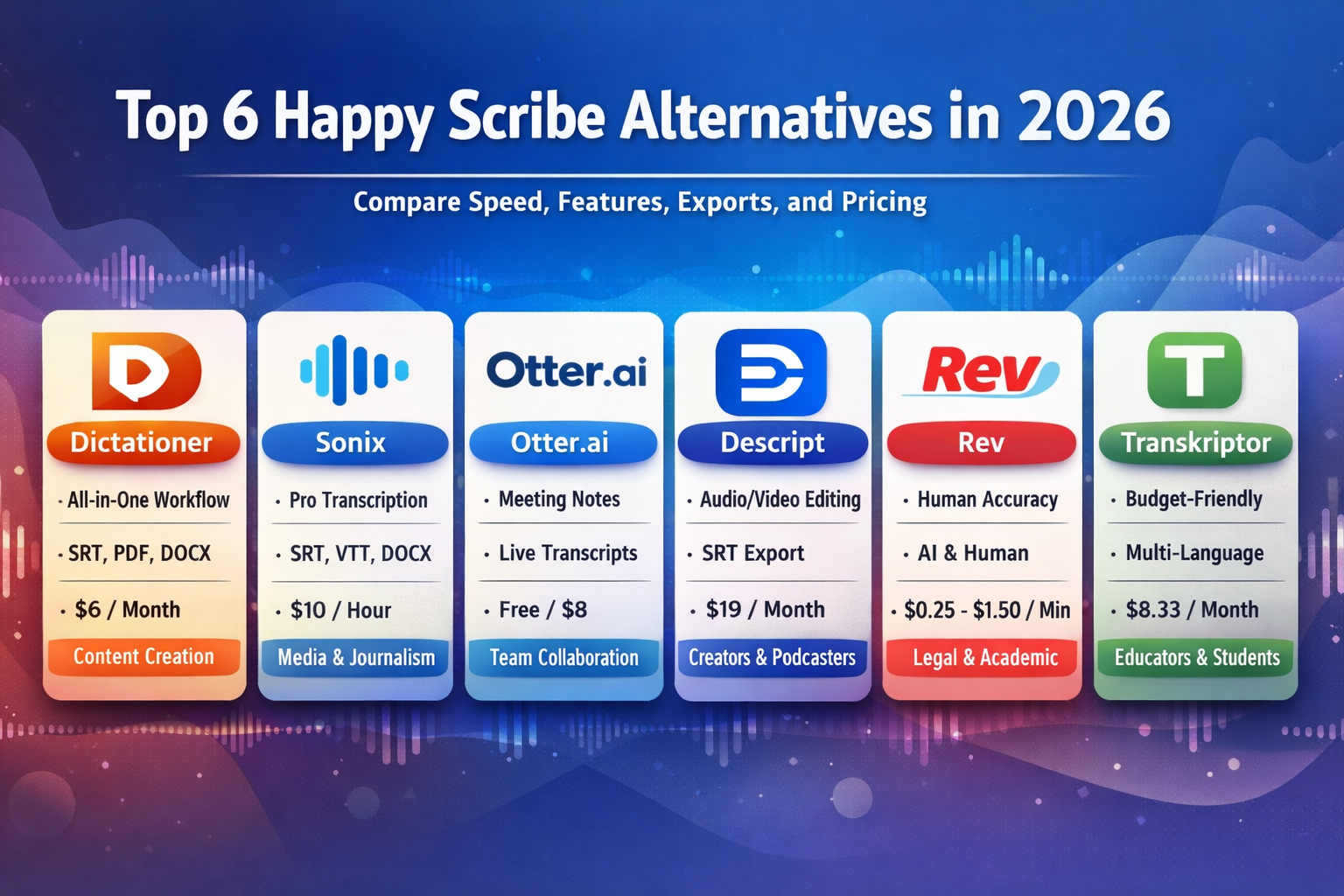
AI-powered transcription and subtitle tools are no longer “nice to have” — they’re essential for creators, marketers, journalists, and teams producing audio or video content. While Happy Scribe has been a popular choice, there are now many alternatives that offer better workflows, deeper automation, richer export options, and additional content tools.
Below is a roundup of the top Happy Scribe alternatives in 2026, including a detailed look at Dictationer, one of the most versatile platforms available today.
1. 🚀 Dictationer – Best All-in-One Transcription & Content Workflow
Dictationer stands out as a complete content workflow companion — not just transcription. It combines accurate AI transcription with detailed content analysis, smart summaries, multiple export options, and generation tools that help you turn audio/video into publishable content fast.
🔗 Website: https://www.dictationer.com
Key Features
- High-accuracy AI transcription with timestamps and speaker detection
- Export to SRT, VTT (for captions), PDF, DOCX
- Automatic summaries, highlights, intent & topic analysis
- Translation and multi-language support
- AI-generated blog drafts, social captions, diagrams
- Collaboration tools, tagging, and review workflows
- Simple web editor to clean up, annotate, and organize content
Pricing Plans
- Unlimited Plan: ~$9/month (monthly) or ~$72/year (annual)
- Unlimited transcription + summaries
- Full export options (SRT/VTT/PDF/DOCX)
- Caption generation, blog drafts, and social media copy
- 👉 Full pricing details: https://www.dictationer.com/pricing
📌 Best for: Content creators, teams, social producers, and anyone who wants an end-to-end content engine, not just transcripts.
2. 🧠 Sonix – Professional Transcription with Rich Editing
Ideal for media teams and professionals who need fast, accurate AI transcription with a robust editor and export formats.
🔗 Website: https://sonix.ai
Key Features
- Auto transcription in multiple languages
- In-browser editor with timestamps and search
- Export to SRT, VTT, DOCX, and more
- Team collaboration and workflow features
Pricing
- Standard (Pay-as-you-go): ~$10/hour of audio
- Premium: ~$22/month + per-hour fees
- Enterprise pricing available
📌 Best for: Journalists, media producers, and teams needing professional transcriptions with flexible exports.
3. 🤝 Otter.ai – Real-Time Meeting Transcription & Notes
Otter.ai excels in live transcription, meeting summaries, and collaboration, making it a go-to for teams and classrooms.
🔗 Website: https://otter.ai
Key Features
- Real-time transcription with speaker labeling
- AI-powered highlights and summary generation
- Shared notes and collaborative review
- Integrations with Zoom and calendar apps
Pricing
- Basic: Free (limited minutes)
- Pro: ~$8.33/month (annual) or ~$16.99/month
- Business: ~$19.99/user/month
- Enterprise available
📌 Best for: Teams, educators, meeting workflows.
4. 🎙️ Descript – Content Creation + Editing Powerhouse
Descript merges transcription with multimedia editing — perfect for creators who want to edit audio/video by editing text.
🔗 Website: https://www.descript.com
Key Features
- Text-based audio/video editing
- Automatic captions and export presets
- AI tools like filler word removal and overdub voice cloning
- Multiple export formats, including SRT
Pricing
- Free Plan
- Hobbyist: ~$19/month
- Creator: ~$35/month
- Business: ~$50/month
📌 Best for: Podcast/audio editors, video creators.
5. 🧾 Rev – Hybrid AI + Human Transcription
Rev offers both automated AI transcripts and human-verified transcripts for maximum accuracy.
🔗 Website: https://www.rev.com
Key Features
- AI transcription for speed and cost-efficiency
- Human-verified transcription for high accuracy
- Caption exports, timestamps, and more
Pricing
- AI Transcription: ~$0.25/min
- Human Transcription: ~$1.50+/min
📌 Best for: High-stakes audio/video like legal, academic, or broadcast work.
6. 💸 Transkriptor – Budget-Friendly AI Transcription
A solid transcription tool for individuals and small teams looking for affordability without sacrificing accuracy.
🔗 Website: https://transkriptor.com
Key Features
- AI transcription with timestamps
- Multi-language support
- Simple editor and export options
Pricing
- Plans start at around $8.33/month, with tiered features depending on usage.
📌 Best for: Budget-conscious creators and students.
🏁 Final Thoughts
The AI transcription landscape in 2026 is rich and varied. While Happy Scribe remains a solid choice, alternatives like Dictationer bring a new level of depth — turning speech into usable content assets across platforms with flexibility and automation.
Dictationer isn’t just a transcription tool — it’s a productivity system that lets you export captions, documents, PDFs, summaries, and blog drafts — all from one platform.
👉 Whether you’re a creator, marketer, educator, or professional, there’s now a solution tailored to the way you work.
Share and Earn Credits!
Share this link and earn credits when others register or subscribe.
Share anywhere - social media, messaging apps, or your favorite platform!
Learn more about Free Credit