How to Turn Instagram Reels into Blog Posts, Captions, and Multilingual Subtitles

Dictataioner
•
Short-form video dominates social media. According to Statista, short-form video remains one of the highest-engagement content formats globally. Platforms like Instagram, TikTok, and YouTube prioritize vertical, fast-paced content.
But here’s the problem:
Videos are hard to search.
Text is easy to index.
That’s why smart creators convert social videos into structured text assets.
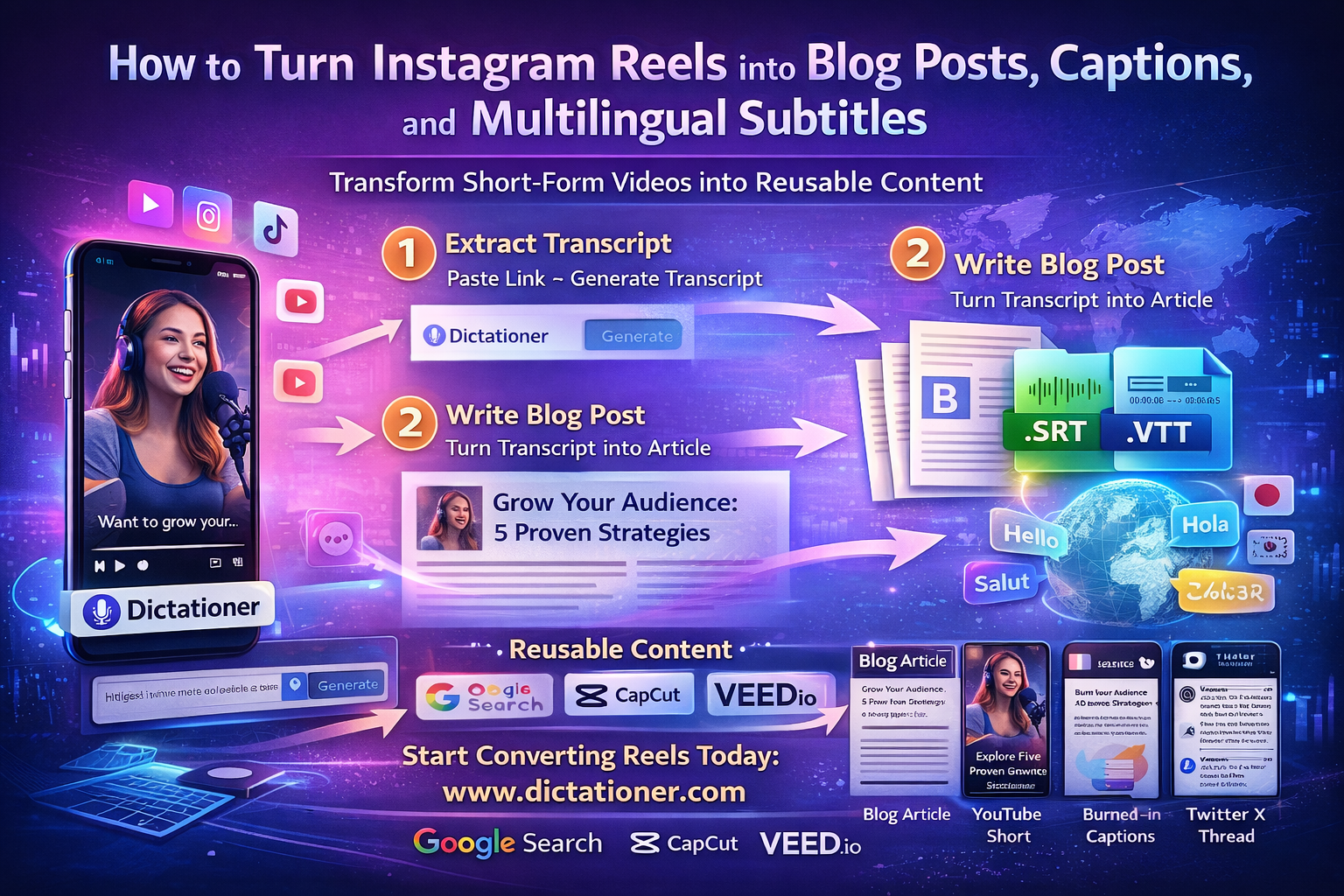
With Dictationer, you can turn Instagram Reels into transcripts, blog articles, multilingual subtitles, and reusable caption files in minutes.
Start here:
👉 https://www.dictationer.com/paste-link/instagram-to-text
Why Transcribing Instagram Reels Matters
Instagram itself confirms that captions improve accessibility and user engagement. (See Meta’s accessibility guidelines: https://about.meta.com/accessibility/)
Additionally, Google Search only indexes text — not video audio. Google’s official documentation on video SEO emphasizes structured data and text content for discoverability:
https://developers.google.com/search/docs/appearance/video
This means:
If your Reel only exists as video, it has limited search visibility.
If it exists as text, it becomes searchable, rankable, and reusable.
Step 1: Extract a Clean Transcript
Instead of manually typing captions:
- Copy your public Reel link
- Paste it into Dictationer
- Generate a timestamped transcript
Dictationer provides:
- AI-based transcription
- Timestamp alignment
- Export as TXT, SRT, or VTT
- Translation support
- Clean formatting for repurposing
Unlike built-in auto-captions, this gives you downloadable, editable files.
Step 2: Convert Transcript into a Blog Post
Once extracted, your transcript becomes:
- A long-form blog article
- A LinkedIn post
- A Medium article
- A knowledge base entry
- An SEO landing page
Google’s Search Central documentation explains how structured content improves discoverability:
https://developers.google.com/search/docs/fundamentals/seo-starter-guide
Instead of writing from scratch, you expand on what you already said in the video.
This reduces content production time dramatically.
Step 3: Export Professional Subtitle Files (SRT & VTT)
Dictationer allows export in:
- .SRT (SubRip Subtitle)
- .VTT (WebVTT)
SRT is one of the most widely supported subtitle formats in the industry.
WebVTT is recommended for HTML5 players (see MDN documentation):
https://developer.mozilla.org/en-US/docs/Web/API/WebVTT_API
These files preserve:
- Exact timestamps
- Subtitle sequencing
- Compatibility across editors
Step 4: Import into Major Video Editors
Once exported, your subtitle files can be imported into:
Virdit
AI-powered short-form video editor optimized for animated captions
CapCut
Official subtitle import documentation:
VEED
Subtitle upload documentation:
https://www.veed.io/help/subtitles
Descript
Transcript-first editing platform:
By using standardized subtitle formats, you are not locked into one ecosystem.
This builds workflow flexibility and professional reliability.
Step 5: Translate and Expand Globally
Instagram’s audience is global.
If you generate translated subtitle tracks, you can:
- Reach new regions
- Improve accessibility
- Increase retention
- Expand brand authority
Research from Wyzowl shows viewers are significantly more likely to finish videos with captions.
Translation + subtitle export creates scalable international distribution.
A Sustainable Content System
Instead of thinking:
“What should I create today?”
Think:
“How many assets can I extract from one video?”
Workflow example:
Instagram Reel
→ Transcribe with Dictationer
→ Export SRT
→ Import into Virdit
→ Publish stylized caption video
→ Expand transcript into blog post
→ Translate for new markets
One Reel becomes 5–7 content pieces.
Why This Strategy Is Future-Proof
Search engines evolve.
Social platforms change algorithms.
But structured text and reusable subtitle files remain universal.
By combining:
- AI transcription
- Standard subtitle formats
- Cross-editor compatibility
- Multilingual expansion
You create long-term digital assets instead of temporary posts.
Final Thoughts
Short-form videos should not disappear into the feed.
Turn them into:
- Searchable articles
- Professional subtitle files
- Multilingual assets
- Reusable content systems
Start converting Instagram Reels today:
And bring captions to life in advanced editors like:
Build once. Repurpose everywhere. Scale intelligently.
Share and Earn Credits!
Share this link and earn credits when others register or subscribe.
Share anywhere - social media, messaging apps, or your favorite platform!
Learn more about Free Credit